Volume Profile Indicator: POC, Value Area and High and Low Volume Nodes, Computed on Real Charts
A volume profile turns the volume of a period sideways, so you see how much traded at each price instead of on each day. Here is how the point of control, the value area and the volume nodes are computed, and what two real profiles of the S&P 500 ETF and Bitcoin show.

On this page
The volume profile is an indicator that shows the volume traded at each price level over a chosen period, as horizontal bars on the side of the chart. The more volume traded at a price, the longer its bar. Where a regular volume histogram answers “how much traded on this day?”, the volume profile answers “how much traded at this price?”. TradingView, which offers several versions of it, explains them on its dedicated Volume Profile page.
Volume profile of the S&P 500 ETF, 24 rows, 70% value area
- Price, daily candles (hollow up, filled down)
- Point of control, the row with the most volume
- Value area, 70% of the volume
- Volume traded at each price row
The parts of a volume profile
- Point of control (POC): the price level with the highest traded volume in the period.
- Value area (VA): the range of price levels in which a set share of all the volume traded, 70% by default.
- Value area high and low (VAH, VAL): the top and the bottom of the value area.
- High volume node (HVN): a peak of the histogram: a price zone where a lot traded.
- Low volume node (LVN): a valley of the histogram: a price zone where little traded.
- Up and down volume: some versions split each row in two, volume from bars that closed up and from bars that closed down.
How a volume profile is computed
Daily data gives one volume figure per bar, not per price, so every profile has to make an assumption about where inside the bar the volume traded. Platforms that have intraday data use smaller bars to get closer; on daily data, the method on this page is the simplest one:
- Take the lowest low and the highest high of the period and cut that range into 24 equal rows.
- Spread each bar's volume evenly over its high to low range, and add each part to the rows it covers.
- The POC is the row with the most volume.
- Starting from the POC, add the next row above or below, whichever holds more volume, until 70% of the total is covered. That range is the value area.
The parts of a volume profile
- POC
- point of control, the row with the most volume
- VAH, VAL
- value area high and low
- HVN
- high volume node, a peak of the profile
- LVN
- low volume node, a valley of the profile
Reading a real profile: the S&P 500 ETF
The chart below the introduction is the profile of the S&P 500 ETF over 250 sessions, from October 30, 2025 to October 28, 2026, on dividend-adjusted prices. The range from 626.11 to 781.62 is cut into 24 rows of about 6.48 each.
- The POC is the row from 671.47 to 677.95, with 15.2% of the period's volume.
- The value area runs from 632.59 to 736.26. The last close, 772.31, is above it.
- Between about 691 and 730 the rows are thin, with 2.2% of the volume or less each: a low volume zone between a lower cluster around the POC and an upper one from about 730 to 775.
The thin zone is easy to explain from the price chart. The ETF closed inside it on 16 sessions between April 15 and May 7, 2026, rising from the lower cluster to the upper one, then only three more times, on June 10, June 26 and July 29. Little time at a price means little volume at that price. Running the same profile over the last 600 sessions, from June 7, 2024, shows the same gap: the three rows between about 692 and 730 hold 0.6%, 1.2% and 1.1% of the volume, and the POC sits at 666.24 to 679.06.
A second profile: daily Bitcoin
Volume profile of daily Bitcoin, 24 rows, 70% value area
- Price, daily candles (hollow up, filled down)
- Point of control, the row with the most volume
- Value area, 70% of the volume
- Volume traded at each price row
On daily Bitcoin over 120 days, from July 1 to October 28, 2026, the POC is the row from 63,965.92 to 65,199.06 and the value area runs from 57,800.19 to 81,229.94. The histogram has two nodes: about 27% of the volume between 62,700 and 65,200, and a second cluster from about 75,000 to 84,000. Between them, from about 66,400 to 75,000, Bitcoin closed on only three days out of 120: July 21, then August 19 and 20, on its way from 69,334.79 to 78,338.03 on August 21. Over the full 600 days we have, the POC lands in the same area, from 63,500.14 to 66,350.12.
Shapes: D, P, b and B profiles
One way to describe a profile is by its shape. A broker’s guide published in November 2021 lists four: a D shape, with the volume bulging in the middle, for a balanced, sideways period; a P shape, with the bulge at the top, when price rose then settled at a new point of control, which it says often indicates a bullish signal; a b shape, with the bulge at the bottom, after a sell-off, which it calls indicative of a bearish signal; and a B shape, two D profiles stacked, with two high volume nodes.
Four common volume profile shapes
- Highlighted row
- the point of control, where the most volume traded
The Bitcoin profile above has a tall node at the bottom, where the POC sits, and a broader, heavier cluster at the top: the rows above about 75,000 hold more of the volume than those below 66,400. It is a double distribution rather than a clean b, like the ETF profile with its two separate clusters. The shape is a description of the period, and there is no published test we know of that measures what comes after each one.
Volume profile on TradingView
TradingView offers several types: Fixed range, for a period you pick; Visible range, for what is on the screen; Session and Periodic, for one profile per session or period; and Auto anchored. For the visible range version, its documentation says the number of rows can be set directly, and the profile is built from lower-timeframe bars, picked so that the visible range holds fewer than 5,000 of them. The screenshot below, taken in 2020, shows the visible range profile of the weekly S&P 500 ETF with 48 rows and a 70% value area.
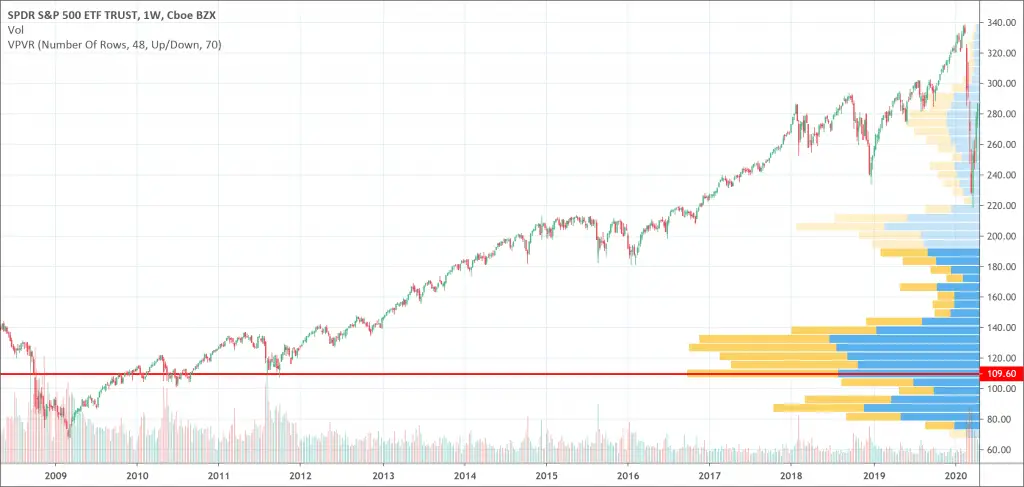
Volume profile on a TradingView chart
Plans differ in features and limits. Compare TradingView's paid plans and trial, or open a chart on  TradingView charts.
A course on the volume profile
A Udemy course, Trading with Price Action and Volume Profile, covers the subject (affiliate link). When we checked on November 2, 2026, the link returned an error page instead of the course, and the course page itself could not be read, so we cannot say whether it is still offered.
Volume profile course page on Udemy
Does it work?
We have no measurement of trading rules based on the volume profile. Our bench measures chart patterns detected by rule against random entries, not indicators (see our methodology). The two profiles above show what the indicator describes, and how its levels follow from where price spent its time.
Other volume tools answer different questions: the VWAP gives the average price paid weighted by volume, the on-balance volume adds and subtracts volume day by day, and the net volume compares up and down volume. Value areas are also a central idea of market auction theory. More tools are listed with the volume indicators.
Frequently asked questions
What is the volume profile indicator?
A horizontal histogram of the volume traded at each price level over a chosen period, with the point of control, the value area and the high and low volume nodes.
What is the POC in a volume profile?
The point of control, the price row with the most volume in the period. It moves when the period or the number of rows changes.
What are the best visible range volume profile settings?
There is no tested best. The value area is 70% by default; more rows give a finer but noisier histogram, fewer rows a coarser one. The screenshot on this page uses 48 rows and the profiles we compute use 24.
What does a P shape or b shape volume profile mean?
A P shape has most of its volume near the top of the range, a b shape near the bottom. They describe where trading concentrated in the period; we know of no published test of what follows each shape.
Is the volume profile free on TradingView?
TradingView lists several volume profile types in its help center. Whether a type is available on a given plan can change; check the plan page before relying on it.
Sources
Passionate about finance, quantitative trading and data analysis. Amaury built the PatternsWizard test bench, which detects each pattern on full price history and measures what happened next against random entries.
PatternsWizard tests chart and candlestick patterns on full market history, against random entries. How we test patterns.